
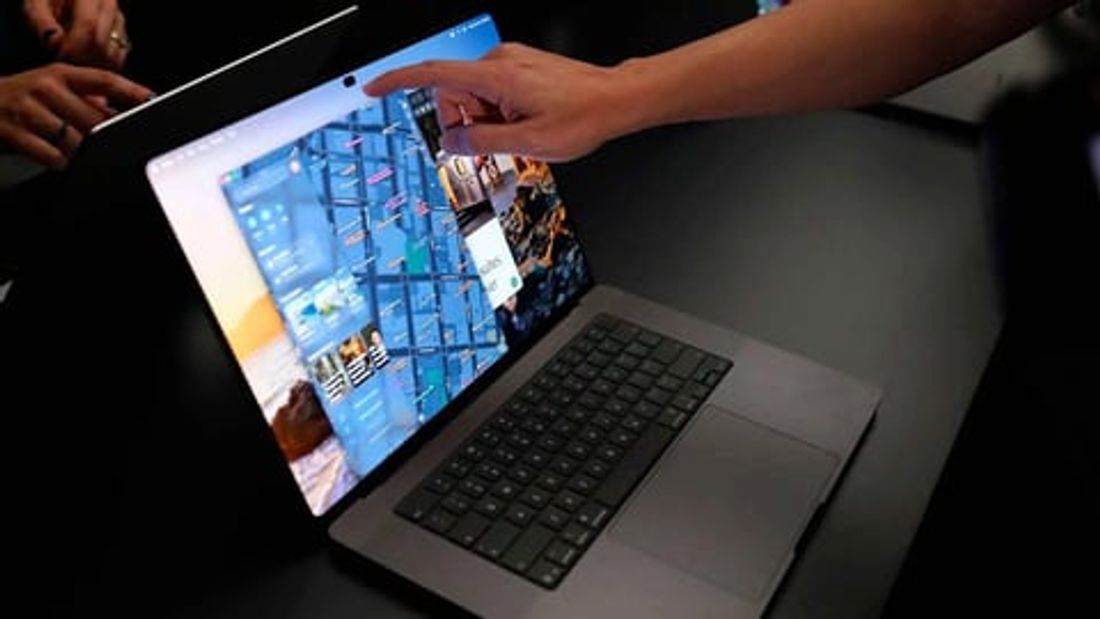
For many years, Apple maintained a different stance from most laptop manufacturers, holding firmly to the idea that a computer screen should be used for display, while navigation and control should be handled through the keyboard and trackpad. The company never introduced this feature on its Mac computers, even as touchscreens became increasingly common on Windows devices.
However, developments surrounding Mac devices and Apple's evolving approach to user interfaces have reopened the debate over whether touchscreens should finally come to MacBooks.
Such a move could mark a shift in the company's philosophy regarding the relationship between users and laptops. It is not simply about adding the ability to touch the screen, but rather about redesigning the operating system and applications to deliver an experience that combines traditional controls with direct finger interaction.
𝗙𝗿𝗼𝗺 𝗥𝗲𝗷𝗲𝗰𝘁𝗶𝗼𝗻 𝘁𝗼 𝗥𝗲𝗰𝗼𝗻𝘀𝗶𝗱𝗲𝗿𝗮𝘁𝗶𝗼𝗻
Apple has long defended the distinction between Mac and iPad devices, arguing that each category serves a different purpose and offers a different way of interacting with technology. Macs rely on a keyboard and mouse or trackpad, while iPads were primarily designed for direct interaction with the screen.
However, this distinction has become less clear with the development of Apple Silicon processors, the growing convergence of the company's operating systems, and the introduction of features that allow iPhone and iPad applications to run on certain Mac devices.
Competition in the laptop market has also pushed manufacturers to introduce hybrid devices that combine tablets and traditional computers, featuring touchscreens that can rotate or detach.
Against this backdrop, Apple has already announced its first MacBook Pro models with touchscreens, marking a shift that brings an end to years of resistance to the idea. Sales are scheduled to begin on November 6.
𝗪𝗵𝗮𝘁 𝗖𝗼𝘂𝗹𝗱 𝗖𝗵𝗮𝗻𝗴𝗲?
If touchscreens become part of MacBook devices, their benefits could extend beyond simply tapping icons and opening applications. The feature could enable direct interaction with photos, maps, and documents, making it easier to zoom, pan, drag, and drop items, while also offering additional options for designers and users who work with visual content.
This may require adjustments to the macOS interface, particularly regarding button and menu sizes and the spacing between control elements, ensuring they are suitable for touch interaction without compromising the traditional user experience.
Apple may also need to develop intelligent mechanisms for switching between finger input and trackpad controls, so users do not feel compelled to abandon either method.
The significance of this move goes beyond introducing a new technological feature. It represents a shift in the design philosophy behind Mac devices, allowing users to combine touchscreen interaction with traditional controls without giving up the keyboard or trackpad.
𝗧𝗼𝘂𝗰𝗵𝘀𝗰𝗿𝗲𝗲𝗻 𝗠𝗮𝗰𝗕𝗼𝗼𝗸 𝗣𝗿𝗼 𝗠𝗼𝗱𝗲𝗹𝘀
Last Wednesday, Apple unveiled its new 14-inch and 16-inch MacBook Pro models, featuring OLED touchscreens, marking the company's entry into the touchscreen laptop market after years of reservations about this category.
The devices are powered by M5 Pro and M5 Max processors and feature several design changes, including replacing the traditional notch at the top of the screen with a Dynamic Island design, alongside improvements to the display and chassis.
The devices are scheduled to reach the market on November 6, following the opening of pre-orders.
𝗖𝗵𝗮𝗻𝗴𝗶𝗻𝗴 𝘁𝗵𝗲 𝗠𝗮𝗰 𝗘𝘅𝗽𝗲𝗿𝗶𝗲𝗻𝗰𝗲
The new screen allows users to interact directly with operating system elements, including opening menus, selecting files, moving items, and zooming in and out using their fingers.
Users can also switch between touchscreen controls, the trackpad, and the keyboard depending on the task, offering greater flexibility when working with applications and visual content.
The significance of this approach lies in Apple's intention not to turn the MacBook into a tablet, but rather to introduce another control method into the traditional computer experience.
According to the company's approach, the keyboard and trackpad will remain the primary means of interaction, while touchscreen functionality will serve to simplify certain tasks for which direct interaction is more convenient.
𝗪𝗵𝘆 𝗛𝗮𝘀 𝗔𝗽𝗽𝗹𝗲 𝗖𝗵𝗮𝗻𝗴𝗲𝗱 𝗜𝘁𝘀 𝗦𝘁𝗮𝗻𝗰𝗲?
Apple was among the most prominent companies opposed to the idea of touchscreens on laptops, based on the belief that repeatedly raising one's arm to touch the screen could be less comfortable than using a trackpad.
However, the growing popularity of this technology in Windows devices, changing user expectations, and increasing convergence between smartphones, tablets, and computers have all contributed to bringing the idea back into consideration.
Advances in OLED displays and processing capabilities have also enabled the company to offer an experience that combines display quality with direct interaction, while attempting to preserve the device's design, weight, and thickness.
𝗗𝗼𝗲𝘀 𝗧𝗵𝗶𝘀 𝗧𝗵𝗿𝗲𝗮𝘁𝗲𝗻 𝘁𝗵𝗲 𝗙𝘂𝘁𝘂𝗿𝗲 𝗼𝗳 𝘁𝗵𝗲 𝗶𝗣𝗮𝗱?
Bringing touchscreen functionality to Mac devices raises questions about the boundaries between laptops and tablets, particularly as some tasks that were once better suited to the iPad are now becoming possible on MacBooks.
The two devices still cater to different needs. The iPad retains its tablet design and flexibility for portable use, while the Mac offers a comprehensive working environment based on an operating system specifically designed for computers.
The remaining challenges concern how much users will actually benefit from touchscreen functionality and whether application developers will be willing to adapt their software to the new interaction method.
Ultimately, this move is not simply about adding a touchscreen to the MacBook. It is a test of Apple's ability to evolve the laptop experience without abandoning the design philosophy that has distinguished its devices for years.
The success of this experiment could determine whether the technology remains limited to professional models or eventually makes its way into other MacBook devices.
𝗦𝗼𝘂𝗿𝗰𝗲: 𝗘𝗿𝗲𝗺 𝗡𝗲𝘄𝘀